Search
Africa edition

Explore Techsoma

Reporting on Africa’s technology economy.

Exclusive Interviews

Meet the Nigerian Behind Hasura Commander: The Open-Source Tool Simplifying Metadata

When Ayodeji Erinfolami got tired of clicking endlessly through Hasura’s dashboard to set permissions and configure events every time he launched a new environment, he did what great engineers do, he automated the pain away.

The result? Hasura Commander, a lean open-source CLI tool that removes friction from configuring metadata in Hasura GraphQL projects.

And the best part? It’s free.

Instead of going to the dashboard every time, you can just run a script and set up everything automatically.”
— Ayodeji Erinfolami, Creator of Hasura Commander

What Is Hasura?

For those new to it, Hasura is an open-source GraphQL engine that turns your database into an instantly usable GraphQL API in minutes. It works with PostgreSQL, MySQL, and SQL Server, and it’s loved for its real-time capabilities, role-based permissions, and event triggers.

Hasura saves developers huge amounts of time by eliminating the need for custom backend code. But here’s the catch:
Configuring metadata, tables, relationships, roles, permissions, and events still requires a lot of manual clicking. That’s where Hasura Commander steps in.

The Problem: Manual Setup for Metadata

Hasura is powerful, but every new environment means setting up tables, roles, permissions, and webhooks all over again through the dashboard. For projects with dozens or even hundreds of tables, this becomes a painful bottleneck.

It became really tedious. I thought, what if I could just automate this?” — Ayodeji Erinfolami

Enter Hasura Commander

Hasura Commander is a command-line tool written in TypeScript that automates metadata configuration. It reads a single YAML file and applies everything to your Hasura instance; fast, consistent, and error-free.


Key Features:

  • Tracks tables, relationships, and permissions
  • Configures event triggers and webhooks
  • Parses a single metadata.yml file
  • Authenticates via admin credentials
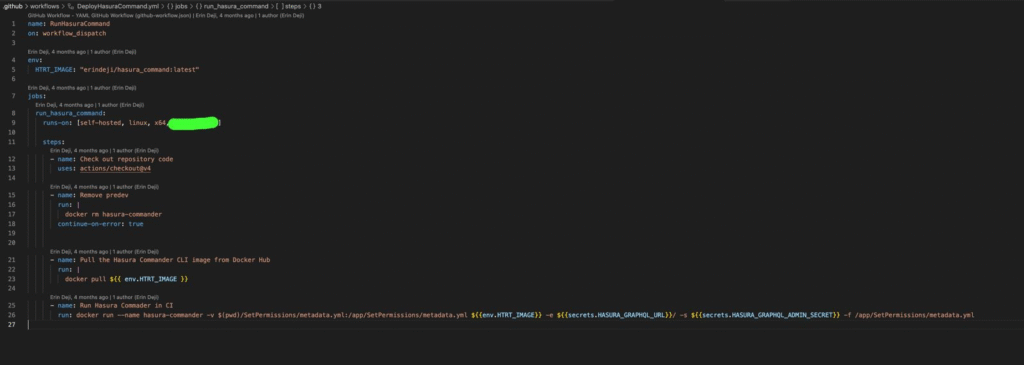
  • Works seamlessly with CI/CD pipelines

GitHub: https://github.com/erinoggz/Hasura_Commander 

It’s my way of giving back. No monetisation. Just something to help developers go faster.”

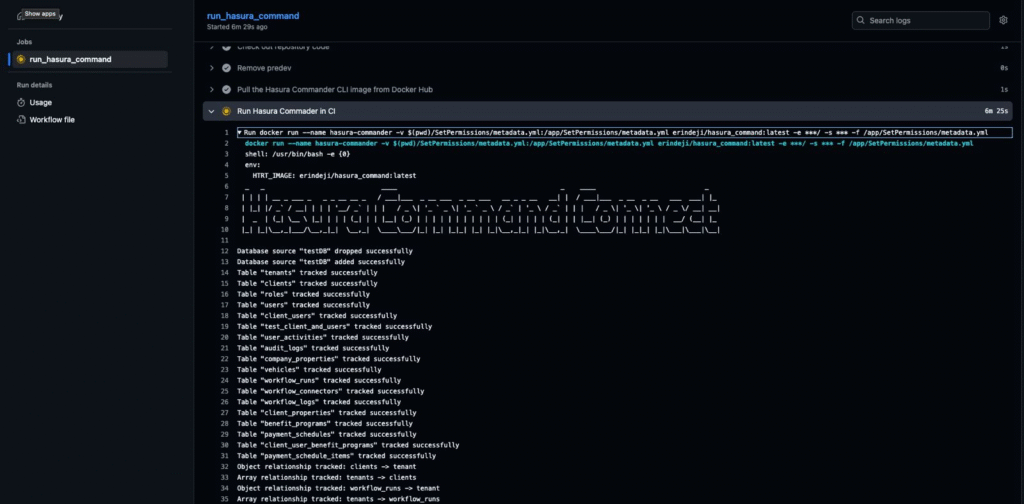
image 2

Quickstart Guide Requirements:

  • Node.js and TypeScript
  • A metadata.yml file (sample included)
  • Hasura endpoint and admin secret

Installation:

git clone https://github.com/erinoggz/Hasura_Commander.git
cd Hasura_Commander
npx ts-node app.ts -e <HASURA_URL> -s <HASURA_ADMIN_SECRET> -f utils/metadata.yml

image 1

His mission?

We need to innovate and stay globally relevant. The world is moving fast—we can’t be left behind.”

Try Hasura Commander Today

Share this storyLinkedIn X

Our reporting follows our editorial standards. To report an error, see our corrections policy.

Welcome Back!

Login to your account below

Retrieve your password

Please enter your username or email address to reset your password.

From the newsroomAfrica, in focus.

The Techsoma Briefing.

The companies, ideas and people shaping African tech.
A considered read, straight to your inbox.

The Techsoma Briefing

One last step

Check your inbox.

Open the email from Techsoma and confirm your subscription to start receiving the briefing.

Can’t find it? Check your spam or promotions folder.

The Techsoma Briefing

For curious minds

Africa’s tech story.
In your inbox.

The companies, ideas and people worth following. Get the Techsoma Briefing for free.

By signing up, you agree to receive Techsoma emails. Unsubscribe anytime. Privacy policy