
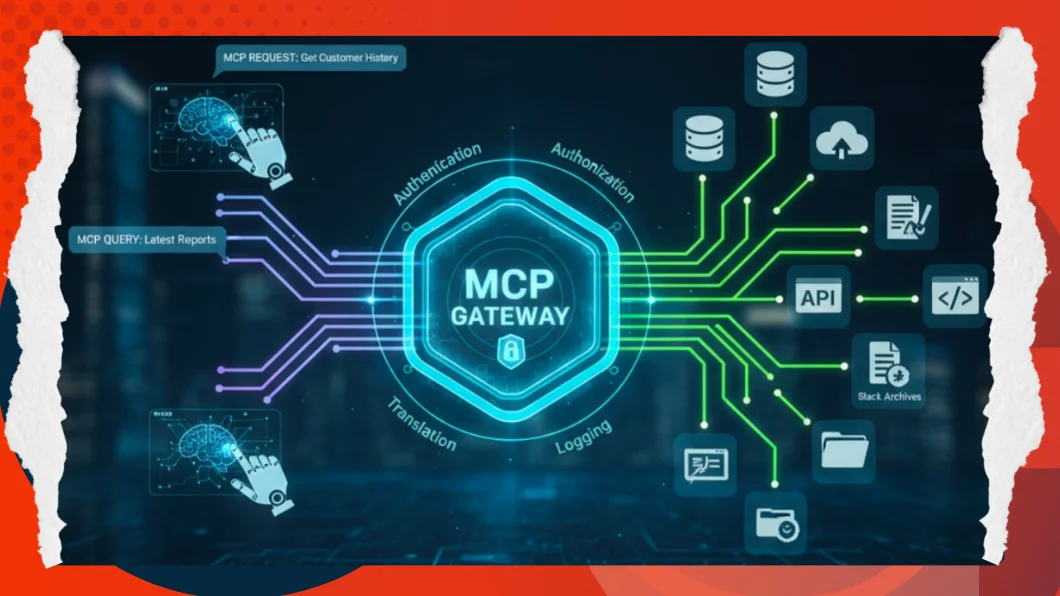
With AI applications moving past their existence as cool prototypes into their role as important business applications, the developers are already running into a hard wall: How do you safely and efficiently connect smart language models to all the fragmented and scattered data that a business actually uses?

Model Context Protocol (MCP) is becoming the solution that is needed. Imagine it to be your AI system’s air traffic controller and security checkpoint. In this guide, we will leave the theory behind and explore how we can architect and design a production-ready MCP connector that would help bridge the gap between the potential of AI and enterprise reality.
The Issue – Chaos of Integration.
Suppose you have a new AI Agent, which should talk to your customer database, internal document storage, and project management APIs. The traditional way needs custom integrations of each source: Salesforce, PostgreSQL, and Google Drive. This leads to:
- Security Issues-Distribution of sensitive access keys in multiple codebases.
- Duplication: Ten systems. Writing out the logging and retrieval logic 10 times.
- Fragility: With the change in API, all the AI agents fall.
This is being addressed by the MCP, which provides a common middle ground. The AI speaks onlythe MCP protocol, while the MCP Server handles the translation to database-specific SQL or API calls
Example Hands-on: Building a Secure DB Connector.
Let’s look at implementing a Database Query Tool. This connector provides an AI agent with the power to access data within SQL or NoSQL databases with the greatest amount of security.
-
- Step 1: The Interface (The Contract)
The tool is defined using the MCP SDK first. Zod schemas are used to type the inputs strictly. This ensures that the AI knows exactly what type of information it needs to provide, such as the type of database, the credentials, and the actual query.export function addDatabaseQueryTool(server: McpServer) { server.tool( "database-query", "Executes READ-ONLY database queries to retrieve information...", { // 1. Configuration Inputs databaseType: z.enum(["MySQL", "PostgreSQL", "MongoDB"]), host: z.string(), database: z.string(), // 2. Security Controls allowedTables: z.string().optional().describe("Comma-separated list of allowed tables"), readOnly: z.boolean().default(true), // 3. The AI's Request userQuery: z.string().describe("Natural language query from the user"), sqlQuery: z.string().optional().describe("Generated SQL/MongoDB query") }, async (params) => { // Implementation logic goes here... } ) } - Step 2: Implementation of the Checkpoint (Security Layer)
Here, the concept of Security comes in. We have to sanitize the input before implementing any code. In our implementation, we specifically filter out unsafe words like DROP, DELETE or UPDATE. This ensures that the MCP Server negates even if the AI is experiencing a hallucinatory command to destroy.function validateQuery(query: string, readOnly: boolean, databaseType: string): boolean { if (!readOnly) return true; const upperQuery = query.trim().toUpperCase(); // Block dangerous write operations const dangerousKeywords = ['DROP', 'DELETE', 'UPDATE', 'INSERT', 'ALTER', 'GRANT']; const hasDangerousKeyword = dangerousKeywords.some(keyword => upperQuery.includes(keyword)); if (hasDangerousKeyword) { throw new Error('Security Alert: Query contains forbidden write operations.'); } return true; } - Step 3: The Bridge (The Universal Translator).
Thirdly, the connector is a translator. The AI speaks MCP, and our tool converts it to MySQL, PostgreSQL, or MongoDB-specific drivers. This is an abstraction that allows your artificial intelligence agent to switch databases without having to modify the internal logic.async function executeQuery(connection: any, query: string, databaseType: string) { switch (databaseType) { case 'MySQL': const [rows] = await connection.query(query); return rows; case 'PostgreSQL': const result = await connection.query(query); return result.rows; case 'MongoDB': // Handle MongoDB specific logic // We can even support natural language to Mongo query translation here const collection = connection.collection(collectionName); return await collection.find(queryObj).limit(100).toArray(); default: throw new Error(`Unsupported database type: ${databaseType}`); } }
- Step 1: The Interface (The Contract)
Deployment Best Practices
Although the logic is addressed by the code above, to deploy a production-ready MCP Server, one needs to take into consideration the infrastructure planning:
- Centralized Credential Management: Database passwords should never be hard-coded into your AI application. The Server should retrieve credentials from a secure vault (such as Azure Key Vault or AWS Secrets Manager) and use context identifiers to scope access appropriately
- High Availability: The server pattern also has one point of failure. Deploy multiple server instances behind a load balancer with advanced health checks that keep the service running.
- Caching Strategy: Caching popular, non-real-time data at the server layer can alleviate the latency and reduce the load on your downstream databases tremendously.
Audit Trails – You have an ideal point of compliance as all the requests pass through this Server. Record all interactions – what AI agent queried, what query was made, and what data was provided as a return. This is required in regulated industries such as finance and healthcare.
The MCP Server is a required change in perspective where AI is viewed as an extension of an application rather than a part of infrastructure. You not only make your development more rapid by standardizing the way that your models may access data, but you also make it far more secure.
Smart money is on early standardization. Use MCP Servers early to avoid the complexity of managing dozens of custom integrations.